
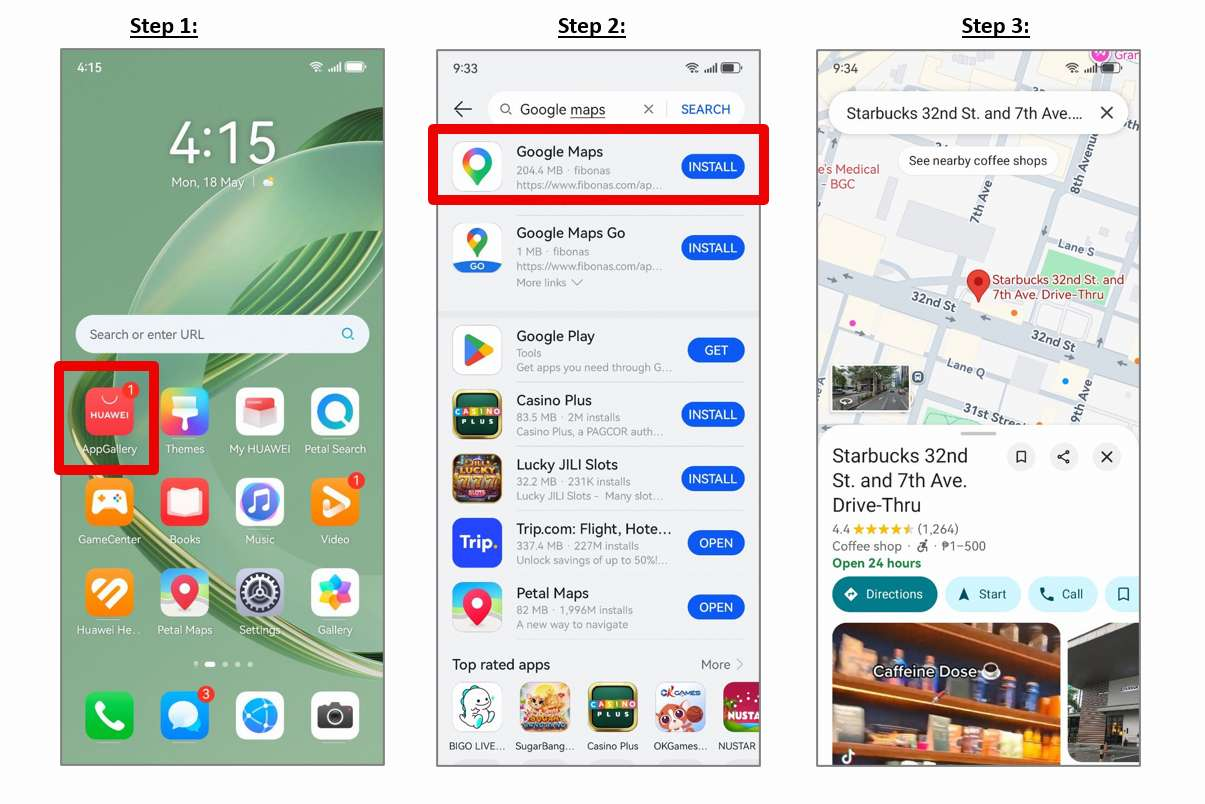
A phone becomes truly useful abroad when it can help you find an address, catch a train, book a ride, and discover nearby services. That is why many new Huawei owners ask one practical question before travelling: does huawei have google maps? The answer is that Google Maps can be installed on many Huawei phones through AppGallery, although the exact setup may vary by model, software version, and region.
Start with HUAWEI AppGallery
Open AppGallery and search for “Google Maps.” Check that the publisher and app name are correct, then tap Install. Huawei’s community walkthrough for does huawei have google maps shows the basic AppGallery route and the steps needed to open the app after installation.
Google Maps installation through AppGallery and GBox.
If AppGallery asks you to install a supporting service, follow the on-screen instructions rather than downloading an APK from an unknown website. This is especially important when the phone will also hold banking, payment, or work accounts.
Sign In and Test the Features You Need
After installation, open Google Maps and sign in if you want access to saved places, reviews, and personal lists. Before relying on it for a trip, test the basics: search for a destination, create a route, switch between driving and public transport, and confirm that location access is working.
The question does huawei have google maps is therefore less about whether the icon appears and more about whether the functions you use every day are available on your specific device. App behaviour can differ across regions, so a quick test at home is better than discovering a problem after landing.
Prepare the Rest of Your Local App Setup
Maps are only one part of an overseas phone setup. Search AppGallery for local ride-hailing, food delivery, airline, hotel, banking, and public transport apps. If an app is unavailable, check the provider’s official website for a verified download or mobile web version.
Allow location access for navigation and transport apps, and enable notifications for services that send booking updates or delivery alerts. Keep AppGallery and the phone software updated, because compatibility fixes often arrive through normal system updates.
Keep a Backup Navigation Option
It is sensible to install a second map service before travelling. Petal Maps or a trusted local navigation app can help when coverage, account access, or regional support changes. Downloading an offline map where available can also reduce dependence on mobile data.
For users still asking does huawei have google maps, the practical answer is yes on supported devices through AppGallery. Install it from a trusted source, test the functions that matter, and prepare a backup before you travel.